Today we will set-up our blogs:
1. We will discuss digital footprints and blogging code of ethics.
2. We will log-in to our blogs and make our first post.
3. Next, we will leave a comment on a classmates blog, using the proper procedure.
4. Control panel will be discovered and we will add a simple sentence to it.
5. We will choose a template.
Wednesday, September 05, 2012
Friday
Thursday, August 30, 2012
Business Computer Applications
Welcome!
Things to do:
1. You need to be sure you returned your Internet Use form (I imagine you have). I can't do anything without that.
2. Fill out this Info Sheet.
3. Please solve a Google A Day. The site times you. So move fast. We will be learning how to search effectively throughout the year.
4. Introduce yourself to the people around you.
5. Write yourself an email that will be delivered on January 1, 2013. Use Futureme.org. Keep the post private. Write yourself and completing the following questions "By January I hope to have learned..." "I think the most important aspect of communication is...."
6. Swearing is bad. Please don't do it.
7. Read the class syllabus.
8. Create a dropbox account. Take the Dropbox tour on the site.
9. Create an Evernote account. Watch some videos about Evernote.
5. Write yourself an email that will be delivered on January 1, 2013. Use Futureme.org. Keep the post private. Write yourself and completing the following questions "By January I hope to have learned..." "I think the most important aspect of communication is...."
6. Swearing is bad. Please don't do it.
7. Read the class syllabus.
8. Create a dropbox account. Take the Dropbox tour on the site.
9. Create an Evernote account. Watch some videos about Evernote.
8. Establish a Google account. Many of you already have one.
- Open Google Drive
- Create a Shared Folder
- Title it "first name-last name BusCompApps". This is one way I will collect your work.
- Share folder with teacher
- my email brandtwschneider@gmail.com
9. Create a note in Evernote called "passwords". Put your accounts, usernames, passwords in it.
Thursday, June 14, 2012
Web Design Final Exam

Exam:
Create a website about the history of the internet. The website should include how the internet has changed family and school life. I would like you to focus on the years 1980, 1995, and 2010.
You have many tools at your disposal including HTML, Flash, Fireworks, Creative commons searches, etc.... Be sure to create a website that is easy to read, highly usable, and accessible.
You may notice that I have not included specific guidelines about pages, images, and the like. By now you should know how to tell a good story by using a website. You should know how to effectively include links. You should know not to include copyrighted images. You should know how to embed video, animation, and images.
When done you must copy your exam folder to the Udrive: Web Schneider. You MUST finish during the allotted time for the exam. I will begin grading once your folder is placed in the UDrive.
Tuesday, June 12, 2012
Final Exam Prep
Today is a prep day for the final exam. You need to know how to do the following.
1. Make a basic webpage using a table for layout that is highly usable.
2. Use fireworks to manipulate an image.
3. Create animations using Flash.
4. Tell a story.
5. Search and evaluate internet sources.
6. Develop an audience.
It will be very hard to complete the exam during the allotted time so I am giving you some assignments now. I urge you to work hard today.
Your exam will be a website that demonstrates the "web" in 1980, 1995, and 2010. I will give all the details next week.
1. Make a basic webpage using a table for layout that is highly usable.
2. Use fireworks to manipulate an image.
3. Create animations using Flash.
4. Tell a story.
5. Search and evaluate internet sources.
6. Develop an audience.
It will be very hard to complete the exam during the allotted time so I am giving you some assignments now. I urge you to work hard today.
Your exam will be a website that demonstrates the "web" in 1980, 1995, and 2010. I will give all the details next week.

- Create a folder in your WDrive. Name it correctly (BSchneiderFinalExam).
- All work will be stored in this folder.
- Research the following questions. Keep the notes in your folder.
- Who is credited with inventing the internet?
- How did the internet develop? Who used it first?
- How many internet enabled devices existed in 1980? 1995? 2010? (you will have to estimate, but you can find this information).
- How many people regularly accessed the internet in 1980? 1995? 2010?
- Think, research, review the following questions.
- How is your family/social life different than a high school student in 1980 or 1995? Focus on how the internet has changed daily life (for better or worse).
- How is your school/academic life different than a high school student in 1980 or 1995?
- Prepare a very simple Flash animation to display on "the internet" page (see above). For example, a computer zooming into focus, or a smartphone "buzzing".
- Prepare simple Fireworks images of "The Internet", 1980, 1995, 2010 to display as headings at the top of each page.
Monday, June 11, 2012
The End is Near
Please turn in your "Who are You?" projects today. If the project is online please write a blog post and provide me with the link. Otherwise please submit into the UDrive folder.
We will use Wednesday for some exam prep and then we have the exam next week. E period on Monday and H period on Tuesday.
Want to get started on Final Exam prep? Then click here. It would be really helpful to start early....
Tuesday, June 05, 2012
Building a Resume: Who are You?
For your final project I am going to ask that you build an online resume or portfolio. Who are you? What do you want to tell the world?
I have spoken before that I am amazed at some of your twitter and facebook accounts. Some of you swear, say bad things about classmates, ridicule your teachers and in a PUBLIC FORUM. Remember, none of your posts are private.
Now, some of you do all those things in the hallway too, but its fundamentally different when you attach the megaphone of the internet. Why? Because its there forever. I mean the real forever. Eternity. We can even track your deleted tweets.
Also, many of you have not made a footprint on the internet. Your blogs in this class were an effort to create one. When people google you, what will they find? If they find nothing, thats not so good either. In 2012, people judge people based on the stuff they have done--and the only place they look is the internet.
Check out some sample student portfolios.
- Example 1: New Tech High
- Example 2: Kevin Stiller
- Example 3: Infographic resumes
- Example 4: Brand D
I'm asking you to create an online resume. You can do this in two ways:
- Create using HTML and notepad and then post in our UDrive.
- Utilize online tools such as wix, weebly or google sites.
Your website should:
- Be yours. Who are you?
- Be creative. Use tools to highlight why people should notice you.
- Be cool. Can you make people visit your page and stay there?
- Be modern. Does your site look like it was made in 2012 or 1996?
A few rules:
- Don't include things like your address or phone number.
- Don't include pictures, videos, text that are copyrighted.
- Must be turned in by Monday June 11. Grades will close in
We will talk much more in class and I will probably add stuff to this page as we go. Good luck!
Thursday, May 31, 2012
Easy Day
Why is this so good? It tells a STORY. Clearly, succinctly, awesome.
Today is a crazy day and I probably won't be in class. You might be in class either....
Please do the following today:
1. Write a blog post about your rockets website if you didn't already. I really saw some great website work in the UDrive. Please tell me in a blog post who you think has the best website! Leave a comment for them.
2. Be nice. Stay quiet.
3. Finish any missing work.
4. Check out my favorites. Which ones do you like? Lets start a discussion on your blog.
Wednesday, May 30, 2012
Rockets!
We had some fun this weekend doing physics experiments. We shot rockets.
Can you make a website that teaches kids how to shoot rockets?
Think about all the tools you now have to use: HTML, CSS, Java, Voki, Fireworks, Flash, video, ShowMe, Google, YouTube, your blog. How will you use these tools to tell your story? How will you tell your story so a four year old can shoot rockets safely and have fun (with the help of a parent...)?
Scroll back through this website to remember some of the tools we have used. I often forget about tools.
Some ideas:
1. Embed a video. Maybe you create one. You can use my video.
2. Use a Voki for instructions (Step 1, Step 2, etc...). Kids love clicking on a voki.
3. Use Flash to create a "rocket ship" in your title.
4. Use CSS and table to create a cool layout for your webpage.
5. Use a prezi or google presentation to layout instructions. Or maybe put them in a Flash movie.
Some essentials:
1. Make your code spotless, clean, and efficient.
2. Save everything in a folder. Copy to UDrive when done.
3. Write a blog post about the project. Embed a video in the post and talk about why you choose the tools you did.
4. Really try to keep your design on the screen, no scrolling. Would multiple pages be better?
Wednesday, May 23, 2012
Coding and Videos
Today and Friday we will split the class. We will be doing two activities.
- Coding. I want to push ahead on the Codecademy work. I want each student to add at least 30 points to their total. Focus on the Web/HTML classes. Before we start please show me how many points you have so I can put a note in my book.
- iMovie. We will spend some time using iMovie and creating movie trailers. iMovie has templates set-up. This is sandbox time. You must save the movie to "camera roll" when done. Be sure to title tit and add your names to the credits.
Sunday, May 20, 2012
Olympics
NBC has a cool thing where you can vote on your top Olympic moment.
I'd like you to spend some time watching the moments today.
Then I'd like you to create an HTML website that highlights your #1 moment. You should:
1. Create a modern design to the website. Be sure to include a title. Don't have your website make some of these mistakes.
2. Include cool graphics for a Header.
3. Embed the video. You can grab the embed code off YouTube.
4. Save everything to a folder (example: bschneiderOlympics). Save to Udrive.
Be creative! Include Flash, Fireworks and any CSS or HTML you picked up doing codecademy.
These websites should be looking more modern each time you build them. Spend some time building clean code.
I love this stuff. People love the Olympics because of the total focus and guts shown by the athletes. Can your website celebrate that? I remember watching almost all of these. Ali lighting the torch makes me cry each time I see it. I love Kerri Strug's vault. Watch her face on the slo-mo. Michael Johnson's 200m was the greatest race ever. I don't know which one I would pick!
End the day with a blog post writing why you choose your clip. Be sure to embed code in blog post and include links.
Thursday, May 17, 2012
Thursday
Nice job. Perhaps some of you can go back and revise your animations?
Today:
1. Everyone writes a blog post about red dots. Where were you last month, how many do you have today? Any "exotic" dots from far away places?
2. Many of you will be in catch-up mode. Choose an assignment you need to make up and submit (or improve!). Many of you did not finish the Bohnsack blog post, the Flash replication, or part of this last project. I'm giving you a chance!
3. I will give some of you a fun project to do with the new iPads.
If there is a comment on your blog, please respond! I will spend much of today making comments and grading your blogs.
Tuesday, May 15, 2012
Memorial Day
Please complete the self-assessment on your blog today. I realize there are some stragglers that need to finish desk work. iPads are away. If you still need them you will need to see me.
1. Please write an introductory paragraph. Introduce the project to your readers.
2. For each task you completed (including blog posts) please write a separate paragraph. Tell us what you did, how many points you should earn, and why. Click here for possible points.
3. Conclude with a summary paragraph. How many total points did you earn?
When done please start the Memorial Day project

Your assignment is to make a poster about Memorial Day.
More information on Memorial Day can be found here: Wikipedia entry Be sure you understand the purpose of Memorial Day before tackling this assignment.
Your assignment is to design an image that could be posted in schools. You will use Fireworks and choose the appropriate tool or tools for your image.
Assignment parameters:
1. You set up the image size when you create a new document: Height=300 pixels, Width =600 pixels.
2. Your images MUST be non-copyrighted.
3. You must be able to defend your choice of a tool in your blog post.
4. You must include "Memorial Day" somewhere in your image. You might decide to include additional text (date, slogan, etc..).
5. You must finish by the end of the period on Monday 5/21.
6. Save in Udrive when done (bschneider) as a .jpg file. All students will save in the same folder so be sure you name it correctly in the WDrive BEFORE you copy it to the UDrive. Be sure to test your work in the UDrive.
4. You must include "Memorial Day" somewhere in your image. You might decide to include additional text (date, slogan, etc..).
5. You must finish by the end of the period on Monday 5/21.
6. Save in Udrive when done (bschneider) as a .jpg file. All students will save in the same folder so be sure you name it correctly in the WDrive BEFORE you copy it to the UDrive. Be sure to test your work in the UDrive.
Now, lets recognize that there are several functions this week (music trip, honors breakfast, etc...). Plan your work accordingly so things get done. I anticipate adding a Flash component to this assignment on Thursday.
Good luck!
Good luck!
Friday, May 11, 2012
Grading
I will begin grading your projects today. This will be a bit cumbersome as I need to find them all. Please be sure you have emailed me your book, shared with me your game, posted your showme on our Seymour High page, put your Flash in the Udrive, and/or finished your coding.
All 9th-11th graders need to fill out this form today.
Click here to see the eBooks as they are published. You need to view books from an iPad. Give link to your friends.
Wednesday, May 02, 2012
iPad reviews
You must have the Flash replication project done and the two coding courses done to do todays assignment.
I would also like you to help a classmate who may be struggling with the Java work if they need it.
Today we will work on doing some iPad reviews. There is some issues with wifi connectivity in the computer lab so I may send you away.
Please write a review of three iPad apps on your blog. This review must include:
- Link to iTunes page for the app.
- Educational uses for the app.
- How easy was it to use and any other review.
Some of the iPads dont have all the apps. Apps to choose from:
- Six Strings
- Morris Lessmore
- DustBuster
- My Story or Scribble Press
- Noteshelf (or any other note program)
- Skitch
- Guardian Eyewitness
- Molecules
You can write your reviews right on the iPad if you choose (and we have internet connection).
If you complete the iPad reviews you should head back to codeacademy and work on a new course.
Tuesday, May 01, 2012
Coding
We will finish up the initial part of codecademy today. The javascript is hard! Keep using the help section and the hints. It helps to go back and redo some sections to remember the code. Many of you noticed how easy the HTML section is. Hopefully the javascript will be easy soon.
I will grade you today:
4 = HTML and Javascript courses finished
3 = One course finished, have over 50 pts.
2 = No course finished but over 40 pts
1 = under 40 pts
0 = under 20 pts
If you finish up you can:
- Start a new course.
- Work on your blog.
- Do some Flash or Fireworks tutorials.
Tuesday, April 24, 2012
Codecademy
Please finish the Flash Replication project first.
Today will start working on learning Java Script using the website Codecademy. Java Script is a modern code that runs a lot of technology including websites, computers, and apps. This is how you will learn how to program your robot. It is important to learn.
I'll be doing it along with you! I've forgotten Java Script and I think its time to relearn using this new site. We can help each other.
I would like you to create an account on the site. This way we can keep track of your progress.
Some of you will really get into this. After we get the basics down we will have a project option to develop computer programs and apps.
Monday, April 23, 2012

Flash Replication Project
Create/name a folder. Call it first initial last name flash (bschneiderFlash)
- Set up a basic HTML page. Name it "home". Title it "Awesome Flash Animations".
- Be sure all your items are in the same folder.
- Embed a shiny headline into the webpage. When you create the movie be sure the canvas is the correct size (long and thin)
- Center it
- Use the <embed src="shiny text.swf" align=center> command to embed the movie title. Note that you are embedding the Movie, not the Flash file.
- Create two Flash Animations
- Stick Figure I give you direction for this.
- Flowers I don't give you directions for this. Solve the puzzle!
- Put the two animations in a 1 row table. You may need to play with the height/width of the movies.
- <Table align="center" border="1">
- <TR>
- <TD><embed src="stick.swf"></TD>
- <TD><embed src="flower.swf"></TD>
- </TR>
All of the tutorials (text, stick, flower) I encourage you to be creative. Feel free to stick to the script, but once you "get it" I would like to see you take it to the next level.
Copy your folder to the UDrive.
Tuesday, April 17, 2012
Who is he?
Recently I got a comment via twitter and started an interesting exchange.

So I spent a little time trying to find out who was this guy? Twitter is interesting because I have so many colleagues on twitter that I never met (583 followers currently). We exchange ideas, debate lessons, and support each other. I have never talked to Jay, yet we exchange information. He reads this blog (and your blogs?) and now I will read his.
And he has an interesting blog! Here is his school blog (leave him a comment? Get a red dot back?)
So we are going to find out some answers as a google review activity. Find answers to each of these and post in an entry in your blog. Each answer should contain a link, image, or video. All of these answers require some thinking. You should demonstrate that you can search effectively, process the information you find, select the best sources, and write about what you find in an interesting manner using links.
I guarantee he will be reading your answers. Much of Moline High may read your answers as well. Write smart.
1. Mr. Bohnsack teaches at Moline High School in Illinois. Where is this school? Find it in google earth.
2. If he had to fly to New York which airport would he likely fly out of?
3. Estimate the total weight of his cattle. His cattle are Herefords. You will have to estimate how many cows he has and how much each weighs and do some math. Show your work.
4. If you go to Moline High School which college team are you most likely to root for?
5. If you lived in Taylor Ridge, Illinois and you wanted to take your wife out to dinner where would you be likely to go?
6. There are two Mr. Bohnsacks at Moline High School. Are they brothers (this one is hard)?
7. If you were driving from Moline High School and drove west for six hours where would you be likely to stop? How about south? East? Now choose your favorite of the three spots and why.
8. If you live in Moline what colors are your tractors most likely to be? (Hint: a big company is headquartered there).
Answers will be posted on student blogs.
Thursday, April 05, 2012
Growing You Blog Audience
Step One
Your task is to create an audience for your blog. How will you do this? The best way is to comment on other people's blogs. Creating an audience for your work is HARD. It took me a long time to build even my meager audience.
Using the first page of blogmeister you should search for other blogs. This is not an easy process as that search engine does not recognize new blogs. One way to do it is to click on Featured Articles. Or you can search by state, country, or age group.
Perhaps start here -- Leave a comment on a 1st graders blog,or here. Be sure to log in first if on blogmeister and leave SUPER nice and SUPER polite short entries for the kids.
When you leave a comment be sure it extends the conversation about the blog post. Don't spam them ("Hey, check out my blog!" or "If you click this link you can read my new eBook!"). But be sure the information boxes are filled out correctly (first name, last initial: leave email blank; your blog address).
Now, when they return to your blog do you have interesting content? Will you have something for them to read?
How will we measure/grade this? Write a blog post RIGHT NOW where you list:
Using the first page of blogmeister you should search for other blogs. This is not an easy process as that search engine does not recognize new blogs. One way to do it is to click on Featured Articles. Or you can search by state, country, or age group.
Perhaps start here -- Leave a comment on a 1st graders blog,or here. Be sure to log in first if on blogmeister and leave SUPER nice and SUPER polite short entries for the kids.
When you leave a comment be sure it extends the conversation about the blog post. Don't spam them ("Hey, check out my blog!" or "If you click this link you can read my new eBook!"). But be sure the information boxes are filled out correctly (first name, last initial: leave email blank; your blog address).
Now, when they return to your blog do you have interesting content? Will you have something for them to read?
How will we measure/grade this? Write a blog post RIGHT NOW where you list:
- How many countries have visited your blog.
- How many red dots do you have.
- How many comments from non-SHS people.
Then we measure the growth. Good luck.
Step Two
Each of you should have a blog post measuring the reach of your blog. Some of you began your campaign to grow your audience by commenting on blogs. We will continue this now.Click here to go to student blogs.
We discussed the difference between spam comments and valuable comments. We discussed the proper way to format your comment (no email, first name last initial, blog address). We discussed the value of responding to comments. We recognized how hard it is to build an audience.
Building an audience is one of the most important skills we will work on. Nearly every product, service, and idea is sold via the web now. You MUST know how to get your work out there to survive and eat. This blog is practice for that.
I'm also hoping to raise the level of work on your google profile. For many of you your twitter feed is your #1 result on google. For many of you this is NOT good. Seriously. And remember, swearing is bad.
Today you will do three things:
1. Write blog posts to increase the quality of your blog (see topics below). You need posts that people will link to, email their friends, post on twitter. We want people to be saying "Read this!".
2. Comment, comment, comment. Using blogmeister or google you will find blogs to comment on. You will leave comments everywhere. You will make the comments interesting and they will extend the conversation.
3. If you find an interesting blog post you will write about and link back to the original blog. This is "polite blogging". This is how traffic gets generated.
Suggested blog posts (remember to include links, a cool title, embed video/images if needed). Choose one or all:
1. If you are a football player: Explain when you would punt the ball and when you "go for it" so anyone can understand it.
2. If you are a cheerleader: Is cheerleading becoming more dangerous? Describe how cheerleading has changed over time. Where is the line between OK and too dangerous?
3. If you are a musician: How have headphones and iPods changed music?
4. If you are an artist/photographer: How has the internet changed how we view art? Does the internet help or hurt art?
5. If you eat: What should we eat? Should we be allowed to eat whatever we want? What if we know what we eat is slowly killing us?
6. If you breath: Whats in the air that you breath? Is it safe to breath?
Monday, April 02, 2012
Additional Flash Work
I will pass out grade sheets today for the third marking period. If there are errors or omissions please let me know. Some of you lost 7-10 points off your grade because you didn't do some blog entries. I don't get that.
You need to complete the basic tutorials form the last session first. Be sure to understand shape tween, motion tween, layers, and masking.
Today please try to complete the following. These are much more complicated. Some of these are video tutorials. Be sure to use your headphones to respect your neighbors. I suggest splitting your screen when doing the tutorials (tutorial on left, Flash on right)
Zoom In Zoom Out
Shiny Text
Drag and Drop (action Script coding)
Basic Slide Show
Importing Sound to Flash
And.....how to stop your movie!
Want to do something else? Search on google or YouTube and find a tutorial.
Friday, March 30, 2012
Flash is dead, but....
Flash is kind of dead.
Adobe just pretty much killed it. But, we have the software and I
think it will be an excellent way to introduce you to animation. We
will explore several tools.
Save
your Flash documents in the WDrive (make a Flash folder). Save them in
two formats. First save the Flash document as an .fla file. Then save
the Flash Movie as a .swf file. Then you will have two files for each
project. You can edit the .fla file. You watch the .swf file.
Flash
is probably new to most of you. GO SLOW. Skipping a step will cause
your project to crash. Coding is about being patient, paying attention
to details, and seeing the big picture.
Please complete the following tutorials at a minimum on Monday:
Please complete the following tutorials at a minimum on Monday:
Students who have those completed should work on:
If you get excited please start more tutorials (see link on right).
Tuesday, March 27, 2012
TED Talks and Writing Effectively
I am on a field trip to WCSU today to rehearse iAlchemy. I am eager to see what you write about these subjects. There is plenty to write about! This is your first grade of the fourth marking period. Write well!
Today's objective is to write three blog posts about these TED talks. I would like to see that you can:
- Title the blog post effectively.
- Format a link correctly. Like this. Not like http://www.w3schools.com/html/html_links.asp this.
- Write a post that interests your readers. Each post should be between 50-100 words.
You must write about THREE of the videos. This should take you just about exactly 85 minutes.
2. David Blaine. Is he crazy, or determined?
3. Robert Lang and his origami. Why has origami changed?
4. Bryan Stevenson and injustice. Reflect on the connection between this talk and the Trayvon Martin case.
And a few extras if you have time:
Rives 1, Rives 2 This guy is a great storyteller.
If anything does not work or is blocked please use google to search for the video. Make it happen.
Monday, March 26, 2012
Catch-Up
I will be catching up on grades today as I close grades for 1st marking period. I will pass out grade sheets.
If you notice errors, let me know. If you notice anything missing please submit to "MISSING WORK" folder in the UDrive-WebSchneider.
Many of you have lots of missing work.
Thursday, March 22, 2012
Good job
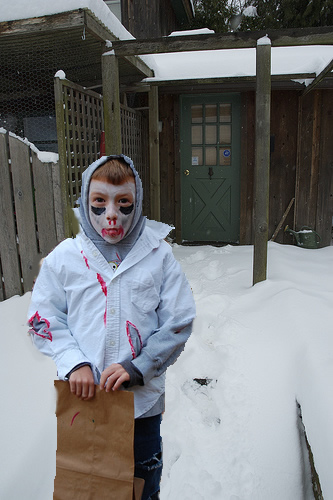 I was about to give Caitlin a zero for manipulating her Fireworks image. I thought "she just took a picture and didn't change it". Then I read her blog. Cool.
Check out some of our images (I'll add more).
Wednesday, March 21, 2012
HTML and Fireworks Exam
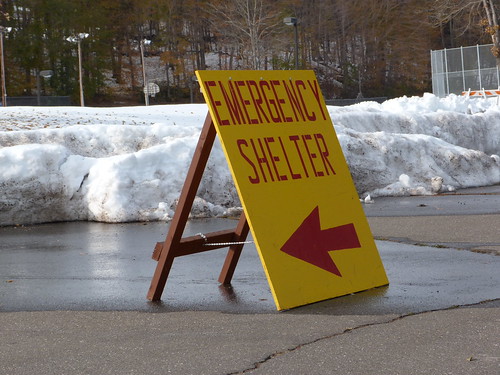
Here is your marking period exam. This is worth 20% of your grade and is due by the end of class.
Please prepare an HTML website using notepad about the October Snowfall. I am looking to see that you can use your new Fireworks talents to enhance your website. The site should include:
1. Create a website using HTML that demonstrates the following:
- That you can use proper HTML codes.
- You can create links that work, are effective, and efficient.
- You demonstrate attention to those with vision issues by including alt text for all images.
- A modern, usable design.
3. You must include an image or animation that has been manipulated using Fireworks. This image must be obtained using Creative Commons (Flickr,wikicommons, etc...). You may create the image yourself if you choose. Save the link, you'll need it later.
4. A summary paragraph. You must include at least one link to valuable information about the storm.
5. Your audience is 5th graders in Seymour.
6. Your website must be free of bias and be highly usable.
How to save your project:
1. Rename your folder in the WDrive. Name it first initial-last name-test (bschneidertest).
2. Copy folder.
3. Find class folder in UDrive. (Udrive-WebSchneider-Class-TEST)
4. Paste folder into UDrive.
5. HAVE NEIGHBOUR TEST WORK TO MAKE SURE EVERYTHING WORKS!! Format the links correctly! Remember, just use the file name (don't add w;drive in code....).
6. Saving correctly is one of our standards. I will not grade your test if I can't find it!
Blog Post:
1. Where did you get the image? Include link. If you created it yourself then please state that.
2. What aspects of coding or image manipulation have you gotten better at?
3. How did you manipulate your image in Fireworks?
4. What do you need to improve on?
Website 80%, Blog Reflection 20%
Rubric
You have two things due. Test and Blog post about test. The bell is your deadline. Do GREAT work.
Monday, March 19, 2012
Tuesday
I am in Manchester to today visiting their high school. Please ensure your FINAL copies of your folders are saved correctly to the UDrive.
Please complete the following activities today. Each activity has a corresponding blog question that should be answered in separate blog posts. If you do not finish in class then you have homework.
You MUST include link to the topic in your blog entry. It should be formatted correctly! If needed then a video should be embedded to your blog. Create blog entries that people will want to read. Tell a story!
I will try to approve your blogs during the day, but I'm not sure I will be able to check.
Answer 5 of the 6 questions.
1. Draw A Stickman. Do the new story (you did the first one in January). Why does this work? How does it keep you on the page?
2. Read this: Facebook/Twitter Shoulder-surfing. Are you prepared to have a college interviewer have you log in to your Twitter or Facebook page? What you write on the internet or text is there for ever. Everything, and I mean EVERYTHING, is public.
3. Watch this video about green men. Would you do that?
4. Watch this video about an escalator. Do you know people who are like that? Someone who just will not walk up the escalator?
5. Should students wear pajamas and slippers to school? Are they sloppy/lazy or are they just being comfortable? Take a side. Where is NOT ok to wear pajamas and slippers?
6. Do teens who text 100's of times per day have a need for attention? Or do they have a lot to say and people are listening? Take a side.
Friday, March 16, 2012
Blogs?
I think your blogs are active. Finally.
Please update them today with some of your prior work including your analysis letter to Mrs. Goodrich, your accessibility and usability questions, TED and games questions and anything else that you can find. Double check spelling, spacing, links, etc...
I expect much of the project to finish today. Do not turn in a new folder yet, we will do that next week. If you want to have me check something then let me know.
Wednesday, March 14, 2012

Tuesday, March 13, 2012
Cyberbullying
I wonder why people feel its OK to be mean. Take a moment and reflect how you talk about other people.
Monday, March 05, 2012
Fireworks Projects
We will be doing fireworks projects for a few weeks. Of course you could use any image manipulation software but we happen to have fireworks on our machines.
I've taken ideas from past projects and from my colleagues to develop this. I've tried hard to find projects that are fun and that you can be creative.
Create a new folder and name it (first initial, last name, project). bschneiderfireworksproject
Major Options (do at least 2):
- Design the front and back of a postcard that might be sent from the location of a work of fiction. Both sides of the cards must be created as graphics.
- The front should use graphic design elements that provide a sense of place or use the classic motifs of old postcards (“Greetings from ______”)_, both pictures and text. The back of the post card should contain a stamp and postmark that fits with the theme of work, as well as an addressee and a message that fits the plot as well.
- How big is a postcard? What would the stamp look like? Were they different sizes in the era of your fiction book?
- Be sure to author the postcard as if you are the character. Use their style of writing.
- This is TWO canvasses (front and back) and TWO separate files (bschneiderpostcard1, bschneiderpostcard2)
- Design the cover of your autobiography. What pictures or graphics would you include? What would you title it? Make sure it really shows off who you are and what you want your audience to see in you by the cover.
- How big are book covers? What is on a book cover?
- You can use my camera to take pictures.
- Create a minimalist poster of any work of fiction, fable, or allegory. Example 1. Example 2. I don't want to show you too many examples as it can ruin your ideas.
Minor Tasks (do all):
- Take this picture of Molly. Change her outfit so its the same color as the girl in front of her.
- Change the H to an S.
- Change STOP to GO. Make it green.
- Use a text tool to make your name super cool.
- Put President Obama in a crowd at a Yankee Game.
Saturday, March 03, 2012
Thursday, March 01, 2012
Fireworks Continued
Today we will continue the Fireworks Tutorials. This is sandbox time. Please complete 8 tutorials today and have the completed products in your Fireworks folder. Now, some of these might not work perfectly as the software has changed. If somethings not working, please substitute another tutorial. Take your time and FOLLOW THE DIRECTIONS.
Some of these will be blocked.....
Some of these will be blocked.....
1. List of tutorials (choose one or all)
You should have 13 examples of images tutorials by the end of class today. This will be the end of sandbox time, we will start our projects on Tuesday.
In addition, I believe our blogs are opened. I would like you to take some of your saved work (usability questions, web analysis letter to Mrs. Goodrich, etc...) and put that content on your blog. This will involve some copy and paste. Be sure to work on your links and include interesting titles.
Plenty to do today. There should be no down time.
Subscribe to:
Posts (Atom)

